
A mesh WiFi system replaces your single router with multiple units that work together to blanket your home in wireless coverage. Instead of the signal degrading as you move away from one central router, mesh nodes hand off your connection seamlessly as you walk from room to room, maintaining speed and reliability throughout the house.
For New Hampshire homeowners — many of whom live in older homes with thick plaster walls, multi-story layouts, or large properties where a single router cannot reach the garage, workshop, or guest cottage — mesh WiFi solves the dead zone problem that traditional routers cannot. Reliable connectivity is also a critical part of winter emergency preparedness, keeping you informed during storms and connected to emergency services.
The latest generation of mesh systems supports WiFi 7, the newest wireless standard that delivers faster speeds, lower latency, and better performance when dozens of devices are connected simultaneously. Whether you are working from home, streaming in multiple rooms, or just tired of the WiFi dropping in the back bedroom, here are the best mesh systems available in 2026. For more product recommendations, browse our full Tech section.
What to Look for in a Mesh WiFi System
WiFi standard matters more than marketing claims. WiFi 7 (802.11be) is the current top tier, offering theoretical speeds above 40 Gbps and a new 6 GHz band for less congested connections. WiFi 6E adds the 6 GHz band to WiFi 6 devices. WiFi 6 (802.11ax) remains excellent and often costs significantly less. For most homes, WiFi 6 or 6E provides all the speed you need — WiFi 7 is most valuable if you have a very high-speed internet plan (1 Gbps or above) and many connected devices.
Coverage area is usually listed per node. A two-pack covering 5,000 square feet works for most standard homes. Larger properties, homes with multiple floors, or buildings with signal-blocking materials may need a three-pack or additional satellite units.
Number of Ethernet ports matters if you hardwire devices like gaming consoles, smart TVs, or desktop computers. Some mesh nodes include only one port; others have four. A 2.5 Gbps WAN port is important if you have a gigabit or faster internet plan.
Ease of setup varies significantly. The best systems walk you through setup via a smartphone app in under 15 minutes with no technical knowledge required. Others still require some manual configuration for optimal performance.
Best Overall: TP-Link Deco BE85
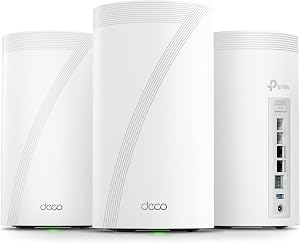
The TP-Link Deco BE85 earns the top spot by delivering WiFi 7 performance at a price that makes earlier premium systems look overpriced. The tri-band system operates across 2.4 GHz, 5 GHz, and 6 GHz bands with a combined theoretical throughput of over 30 Gbps — far more than any home internet connection can saturate, but that overhead translates to better performance when multiple devices compete for bandwidth.
Each node covers approximately 3,000 square feet, so a two-pack handles most homes comfortably. The nodes include four Ethernet ports each with a dedicated 10 Gbps backhaul port, which is future-proofing most homeowners will not need yet but will appreciate as internet speeds continue climbing.
Setup through the Deco app takes under 10 minutes and walks you through placement recommendations based on your home layout. The system supports over 200 connected devices, which sounds excessive until you count every phone, tablet, laptop, smart speaker, TV, thermostat, security camera, and appliance on your network.
TP-Link includes a built-in security suite and basic parental controls at no ongoing subscription cost, which sets it apart from competitors that charge monthly fees for similar features.
Best Value: Eero Pro 6E
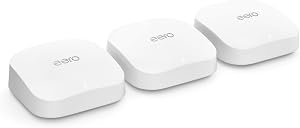
Amazon’s Eero Pro 6E remains one of the best mesh systems for homeowners who want reliable whole-home WiFi without paying for WiFi 7 speeds they may not need yet. The tri-band WiFi 6E system covers up to 2,000 square feet per node and handles over 100 devices without breaking a sweat.
What makes the Eero Pro 6E stand out is its simplicity. The Eero app is the most intuitive in the mesh WiFi market — setup takes about 10 minutes, ongoing management is clean and straightforward, and software updates happen automatically in the background. You plug it in, follow the app, and forget about it. For homeowners who have no interest in configuring network settings, that simplicity is the feature that matters most.
The 6E supports 160 MHz channels on the 5 GHz band for fast connections to laptops and phones, while the dedicated 6 GHz band handles backhaul between nodes so your usable bandwidth is not shared with device traffic. Each node has two Ethernet ports, which is enough for a TV and a gaming console or desktop at each location.
Eero does push its optional subscription service for advanced security and content filtering, but the base system works perfectly well without it.
Best for Large Homes: Netgear Orbi 970 Series

When you need to cover a lot of square footage — a large colonial, a multi-building property, or a home with a detached garage or workshop — the Netgear Orbi 970 delivers the kind of range and power that smaller systems cannot match.
The Orbi 970’s router unit covers up to 3,300 square feet on its own, and each satellite adds another 3,300 square feet. A router-plus-two-satellite kit blankets nearly 10,000 square feet, which is enough for even the largest residential properties. The system uses a dedicated quad-band WiFi 7 backhaul between router and satellites, which keeps the inter-node communication separate from your device traffic for consistently fast speeds.
Each unit includes four Ethernet ports and a 10 Gbps WAN port, and the build quality reflects the premium pricing — the Orbi units are among the most solidly constructed mesh systems available. For homeowners with gigabit or multi-gig internet plans, the 10 Gbps backhaul and wired connections ensure you are actually getting the speeds you are paying for.
The trade-off is price. The Orbi 970 system costs significantly more than competitors, and the ongoing Netgear Armor subscription for security features adds annual expense. But for large properties where coverage is the primary concern, the Orbi’s range and performance are hard to match. If you are investing in whole-home connectivity, it is also worth ensuring your home has reliable power during storms — our guides to the best whole house generators and best portable power stations cover backup options at every budget.
Best for Starlink Users: TP-Link Deco XE75

Starlink has been transformative for rural New Hampshire — providing broadband-level speeds to areas where DSL or nothing at all were the only options. But Starlink’s included router has limited range and feature set, and many homeowners find they need a better WiFi system to distribute that signal throughout their home.
The TP-Link Deco XE75 is an excellent match for Starlink setups. The WiFi 6E tri-band system provides solid whole-home coverage at a moderate price, and it handles the variable latency and speed fluctuations of satellite internet gracefully. Each node covers about 2,500 square feet, and a three-pack handles most homes with room to spare.
Setup requires putting the Starlink router into bypass mode (or using the Starlink Ethernet adapter) and connecting the Deco as your primary router. The Deco app walks through this process, and TP-Link has specific support documentation for Starlink configurations.
The XE75 is also the right choice for homeowners on fixed wireless internet, which is another common option in rural NH areas not served by cable or fiber. The system’s Quality of Service features let you prioritize video calls and streaming over background downloads, which helps optimize a connection that may not have unlimited bandwidth.
Best Budget: TP-Link Deco X55
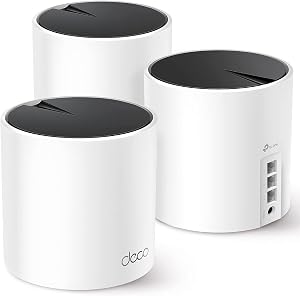
Not everyone needs WiFi 7 or 6E, and the TP-Link Deco X55 proves that a WiFi 6 mesh system can still deliver excellent whole-home coverage at a fraction of the cost of premium options. A three-pack typically sells for under $200, which makes it accessible for budget-conscious homeowners.
Each X55 node covers about 2,000 square feet, so the three-pack blankets up to 6,500 square feet — more than enough for most homes. The dual-band WiFi 6 system handles over 100 devices and includes three Ethernet ports per node, which is more wired connectivity than many premium systems offer.
The X55 uses the same Deco app as TP-Link’s higher-end systems, so setup and management are equally straightforward. You give up the 6 GHz band, the fastest theoretical speeds, and some premium features, but for households with internet plans under 500 Mbps — which includes most New Hampshire connections outside of the southern tier’s cable and fiber coverage — the X55 delivers everything you need without overspending.
Placement Tips for New Hampshire Homes
Getting the most from your mesh system depends heavily on where you put the nodes. A few guidelines specific to the kinds of homes common across New Hampshire:
For older homes with plaster-and-lath walls, expect each node to cover a smaller area than advertised. Plaster is significantly more signal-blocking than modern drywall. Plan on placing nodes closer together — every 30 to 40 feet rather than the 50+ feet that works in newer construction.
In multi-story homes, place one node on each floor rather than trying to reach upper floors from below. WiFi signal travels horizontally much better than vertically, especially through older floor constructions with dense subfloor and hardwood.
For detached garages, workshops, or guest cottages, a mesh node in the main house near the window facing the outbuilding often provides enough signal for basic connectivity. For more reliable coverage, running an Ethernet cable between buildings and placing a wired mesh node in the outbuilding is the best approach.
If you use Starlink and the dish is mounted away from where you need coverage, the Ethernet cable from the dish to the first mesh node is the only connection that matters — once the signal is in the mesh system, the nodes handle distribution wirelessly. Keep in mind that your mesh system needs power to function — during outages, a portable power station can keep your router and mesh nodes running for days, maintaining your internet connection when you need it most. The Wi-Fi Alliance provides detailed technical specifications on the WiFi 7 standard, and The Wirecutter’s mesh WiFi testing methodology is a useful reference for comparing real-world performance data.
For related coverage, see our reporting on The Best Connected Appliances for 2026.
For related coverage, see our reporting on Granite Staters Trust AI Less but Use It More, New UNH Poll Finds.
Do I need WiFi 7 in 2026?
Most homeowners do not need WiFi 7 yet. WiFi 6 and WiFi 6E systems provide more than enough speed for streaming, video calls, gaming, and smart home devices on internet plans up to 1 Gbps. WiFi 7 becomes valuable when you have a multi-gigabit internet plan, a very high number of connected devices, or you want future-proofing for the next 5-7 years. For budget-conscious buyers, WiFi 6 mesh systems offer excellent value.
How many mesh WiFi nodes do I need?
Most standard homes (1,500-3,000 square feet) need two to three nodes. Larger homes, multi-story buildings, or properties with thick walls may need three to four. A good rule of thumb: start with one node per 1,500-2,000 square feet for newer construction, or one per 1,000-1,500 square feet for older homes with plaster walls. Most mesh systems let you add nodes later if needed.
Will a mesh WiFi system work with Starlink?
Yes. Most mesh WiFi systems work well with Starlink when configured as the primary router. You will need to put the Starlink router into bypass mode or use the Starlink Ethernet adapter to connect your mesh system directly. Systems from TP-Link, Eero, and Netgear all have straightforward setup processes for Starlink connections. A mesh system typically provides better whole-home coverage than the Starlink router alone.


