
Buying a laptop for a student in 2026 is simultaneously easier and more confusing than ever. The hardware has gotten remarkably good at every price point — a $300 machine today outperforms a $1,000 machine from five years ago in most everyday tasks. But the sheer number of options, operating systems, and specifications makes choosing the right one feel overwhelming.
This guide cuts through the noise. We have tested and researched the best laptops and Chromebooks for students across price ranges, focusing on what actually matters for schoolwork: reliability, battery life, keyboard quality, screen readability, and value.
Chromebook vs. Windows vs. Mac: Which Platform for Students?
Before looking at specific models, the platform question matters.
ChromeOS (Chromebooks) runs Google’s lightweight operating system. It is fast, secure, nearly immune to viruses, and dirt cheap. Chromebooks excel at web-based work — Google Docs, email, research, streaming, and web apps. They struggle with specialized software that requires Windows or Mac, which matters for some college programs (engineering, graphic design, video production). For K-12 students and college students in humanities, business, and most social sciences, a Chromebook handles everything they need.
Windows offers the widest software compatibility. If a student needs specific applications — Microsoft Office desktop versions, MATLAB, AutoCAD, Adobe Creative Suite, or specialized STEM software — Windows is the safest choice. The tradeoff is higher cost, more maintenance (updates, antivirus), and generally shorter battery life than Chromebooks.
macOS (MacBooks) offers excellent build quality, strong battery life, and a polished user experience. The M-series chips from Apple have made even the base MacBook Air a capable machine for everything short of heavy gaming. The catch is price: the cheapest MacBook Air starts at $999, which prices out many student budgets.
Best Chromebooks for Students
Acer Chromebook Plus 516 GE — Best Overall Chromebook

Price: $450 | Screen: 16” 2560x1600 IPS | Processor: Intel Core i5-1240P | RAM: 8GB | Storage: 256GB SSD
This machine has no business being this good at this price. The 16-inch high-resolution display is sharp enough for comfortable reading and multitasking. The Intel Core i5 handles anything ChromeOS can throw at it without hesitation. Battery life stretches to roughly 9 hours of mixed use. The keyboard is full-size with a number pad, which students doing any amount of data entry or math will appreciate.
The “Plus” designation means Google guarantees this Chromebook will run well with Google’s AI features and receive updates through at least 2034. This is the one to buy if budget allows.
Lenovo Chromebook Duet 3 — Best Budget 2-in-1
Price: $280 | Screen: 11” 2000x1200 IPS | Processor: Snapdragon 7c Gen 2 | RAM: 4GB | Storage: 128GB eMMC
The Duet 3 is a detachable tablet-laptop hybrid that includes a keyboard cover and kickstand in the box. It is ideal for younger students or anyone who wants tablet flexibility with laptop functionality. The screen is excellent for its size, and the included stylus support makes it useful for note-taking.
The 4GB of RAM limits heavy multitasking, but for one-thing-at-a-time schoolwork — writing a paper, reading an assignment, watching a lecture — it performs without complaint. Battery life is stellar at roughly 11 hours.
ASUS Chromebook CM14 Flip — Best Mid-Range Value
Price: $350 | Screen: 14” 1920x1080 IPS touchscreen | Processor: MediaTek Kompanio 520 | RAM: 8GB | Storage: 128GB eMMC
ASUS has quietly built some of the best Chromebooks on the market. The CM14 Flip offers a 360-degree hinge (useful for tablet mode and presentations), a solid 14-inch touchscreen, and 8GB of RAM that keeps things running smoothly with a dozen browser tabs open. The build quality is a cut above most sub-$400 Chromebooks, with a satisfying keyboard and a chassis that does not flex when you pick it up.
Best Windows Laptops for Students
Acer Aspire Go 15 — Best Budget Windows Laptop
Price: $380 | Screen: 15.6” 1920x1080 IPS | Processor: AMD Ryzen 5 7520U | RAM: 8GB | Storage: 256GB SSD
For students who need Windows but do not have a MacBook budget, the Aspire Go 15 delivers. The Ryzen 5 processor handles Office, web browsing, light photo editing, and Zoom calls without strain. The 15.6-inch screen provides enough workspace for side-by-side document viewing. Battery life runs about 8 hours, which gets through a full school day.
The build is plastic and the speakers are mediocre, but at this price, those are acceptable tradeoffs for a machine that reliably runs Windows applications.
Lenovo IdeaPad Slim 5 — Best Mid-Range Windows Laptop

Price: $650 | Screen: 14” 2.8K OLED | Processor: AMD Ryzen 7 7730U | RAM: 16GB | Storage: 512GB SSD
The IdeaPad Slim 5 punches into near-premium territory. The OLED display is gorgeous — colors are vivid, blacks are true black, and text rendering is exceptionally crisp. The Ryzen 7 processor and 16GB of RAM handle demanding workloads: multiple Office documents, dozens of browser tabs, video calls, and light creative work simultaneously.
At 3.3 pounds, it is highly portable. Battery life reaches about 10 hours for general use, less with the OLED display at full brightness. This is the machine for college students who need Windows power without the bulk or cost of a gaming laptop.
HP Pavilion Plus 14 — Best for STEM Students
Price: $750 | Screen: 14” 2880x1800 OLED | Processor: Intel Core Ultra 7 155H | RAM: 16GB | Storage: 512GB SSD
The Intel Core Ultra 7 processor in the Pavilion Plus brings enough computational power for coding, data analysis, CAD work, and moderate creative tasks. The NPU (neural processing unit) accelerates AI-powered features in compatible software, which is increasingly relevant for students working with machine learning or AI tools.
Build quality is solid, the keyboard is comfortable for extended typing, and the OLED display makes long reading sessions easier on the eyes. At $750, it sits at the upper end of most student budgets but offers performance that will last through four years of demanding coursework.
Best MacBook for Students
MacBook Air M3 — The Apple Pick
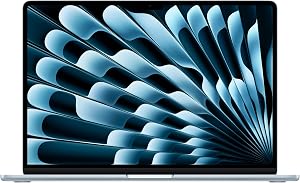
Price: $999 | Screen: 13.6” Liquid Retina | Processor: Apple M3 | RAM: 8GB unified | Storage: 256GB SSD
If a student can afford it, the MacBook Air M3 is simply the best overall student laptop. The M3 chip delivers desktop-class performance in a fanless, silent chassis. Battery life regularly exceeds 15 hours. The build quality is exceptional. The display is beautiful. The keyboard is the best on any current laptop.
The base model’s 8GB of unified memory and 256GB of storage will constrain power users, but for most students, the base configuration handles four years of coursework without issue. The 15-inch model ($1,199) adds screen real estate without significant weight.
Tips for Buying a Student Laptop
Prioritize battery life over raw speed. A laptop that dies by 2 PM is useless regardless of how fast its processor is. Aim for 8 hours minimum of real-world battery life.
8GB of RAM is the floor. For Chromebooks, 4GB still works for light use, but 8GB provides a much better experience. For Windows machines, 8GB is the minimum and 16GB is preferred.
A good keyboard matters more than a fast processor. Students write constantly. A cramped, mushy keyboard will slow them down and frustrate them daily. Test keyboards in person if possible, or read reviews that specifically address typing feel.
Do not overspend on storage. Between Google Drive, OneDrive, and other cloud storage services, local storage is less critical than it once was. 128GB is adequate for Chromebooks, 256GB for Windows and Mac.
Ensure strong wifi capability. Wifi 6 or Wifi 6E is standard on most current laptops and essential for reliable performance on busy school networks. For home connectivity, pair with a solid router — our mesh wifi system guide covers the best options for whole-home coverage.
For New Hampshire students heading to UNH, Dartmouth, Keene State, Plymouth State, or any of the state’s community colleges, check your school’s IT department website before buying. Many programs have specific hardware and software requirements, and some offer student discounts or loaner programs that can significantly reduce costs.
For related coverage, see our reporting on NH House Tightens Crypto Kiosk Rules After $2.6 Million In Hampton Scams.
For related coverage, see our reporting on Granite Staters Trust AI Less but Use It More, New UNH Poll Finds.
Is a Chromebook good enough for college?
For most college students, yes. Chromebooks handle web-based research, Google Workspace (Docs, Sheets, Slides), email, video conferencing, and streaming without issue. They fall short only when a program requires specific Windows or Mac software — common in engineering, architecture, graphic design, and some STEM fields. Check your program’s software requirements before committing to ChromeOS. Many colleges now offer virtual desktop environments that let Chromebook users run Windows software through a browser.
How much should I spend on a student laptop?
A capable student laptop starts at around $300 for a Chromebook and $380 for a Windows machine. The sweet spot for most students is $400 to $700, which buys a machine with enough performance, battery life, and build quality to last through several years of schoolwork. Spending more than $1,000 is rarely necessary unless the student has specific performance needs for creative work, engineering software, or gaming.
How long should a student laptop last?
A well-chosen laptop should last 3 to 5 years of student use. Chromebooks receive guaranteed software updates for 8 to 10 years from their manufacture date. Windows laptops and MacBooks can last even longer with proper care. Battery degradation is typically the first issue — expect to lose about 20% of original battery capacity after 2 to 3 years of daily use. Choosing a model with strong initial battery life gives you a buffer as the battery ages.


